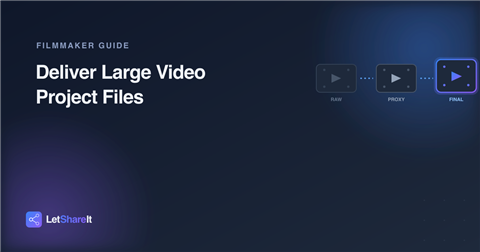
A single project can mean moving footage in several different directions: raw camera files handed off to an editor, proxies sent out for a director's review, a graded final export delivered to the client. None of it is small, and none of it tolerates the kind of compression a messaging app or email attachment forces on you. Here's how editors and filmmakers actually get large project files where they need to go.
The different things you're actually sending
- Raw footage — camera-original files handed to an editor or colorist, often the largest and most quality-sensitive transfer in the whole project.
- Proxies — lower-resolution versions sent for review so a director or client can give notes without needing the full raw files.
- Graded exports and final masters — the finished deliverable, where quality loss at the last step undoes everything upstream.
- Project files and media — when a second editor or collaborator needs the full project, not just a rendered output.
Each of these has a different urgency and sensitivity, but they share the same underlying problem: they're too large for conventional sharing, and compressing them to fit defeats the purpose.
What to look for in a delivery method
- No re-encoding. A tool that quietly recompresses video to save storage will hand your client a visibly different file than the one you exported.
- A size limit that matches your actual files. A few minutes of 4K or RAW footage can run into tens of gigabytes before you've even started a 2–5 GB cap won't get you through a single scene.
- No account required for the client. Directors, producers, and clients shouldn't need to sign up just to pull down a cut.
- Password protection for unreleased work. Footage that hasn't been announced or released needs more than an unguessable link.
- An expiry you control. Review cuts and temporary handoffs don't need to stay live forever.
How to deliver project files with Letshareit
- Go to letshareit.com/upload — no account needed to send.
- Drag in the file or folder. A multi-file export or a folder of footage gets zipped automatically, so your client downloads one file instead of a scattered list.
- Set a password if the footage is unreleased or client-confidential.
- Choose an expiry that matches the handoff short for a quick review cut, longer for a final deliverable.
- Send the link. Files are stored and delivered exactly as uploaded, so a ProRes export or RAW camera file arrives at full quality.
For the files themselves, see sending large video files without compression.
Practical tips by scenario
- Handing off raw footage to an editor: use a longer expiry (or recover it later if needed) since an edit can take days or weeks, and the file is often too large to easily re-send.
- Sending a review cut to a director or client: a short expiry works well here the point is quick feedback, not permanent access.
- Delivering the final master: password-protect it until the project is publicly released, and keep a record of when the link was sent and to whom.
- Separate proxies from raw files. Sending both in one batch makes recipients guess which is which two clearly named links avoid that entirely.
- Plan for your actual file sizes. Basic supports up to 60 GB per upload, and Pro supports up to 500 GB enough for full raw scenes or complete finished projects. See pricing.
The bottom line
Video project files don't shrink to fit a messaging app, and they shouldn't have to. Upload once at full quality, control who can open it and for how long, and let your client, director, or collaborator download directly no account, no compression, no guesswork. Send your next cut or export now.